
- A CPU vulnerability has been found and disclosed by Google Project Zero team. This vulnerability will affect many CPUs, including those from AMD, ARM and will allow unauthorized party to access contents of memory that would be otherwise unavailable. This vulnerability will allow attackers to a virtual machine to gain access to other virtual machines hosted on the same physical machine. Read more here.
- The Azure classic portal will be officially decommissioned on January 8th 2018. Migrating features from the old portal has been a huge ongoing effort from Microsoft but now it’s time to fully switch to the new portal. Classic portal users do not need to take any action and services will be available in the new Azure portal. Previously, it was announced that the plug will be pulled on 30th of November. Read more here.
- Azure now lets you prepay one year or three years worth of virtual machine usage at reduced cost using Azure Reserved VM Instances (RIs). The idea is that you would save costs by making a one-year or three-year commitment to using the resource at reduced costs.
- Often when you deal with a number of accounts in Azure portal, it is easy to lose track of resources, why they were created, who owns them and how is a typical resource justified in terms of costs. This calls for implementing a strategy to keep the resources tidy. The way resources are created in different subscriptions and different resource groups plays should be governed by an enterprise-wide set of instructions. I found a good article here describing what you need to consider when implementing a naming convention and best practices.
- Late last year, Microsoft announced the general availability of Bash in Cloud Shell. This is an attempt to give users the ability to manage and deploy Azure resources from virtually anywhere. Bash in Cloud Shell comes equipped with commonly used CLI tools, including Linux shell interpreters, Azure tools, text editors, source control, build tools, container tools, database tools, and more. A browser version of the shell can be accessed here. To read more on the subject here.
Multiple bindings on One Azure VM Website
You might have faced the need to access a website hosted on Azure VM using multiple addresses. This is particularly true if there are different domains you would like to associate with your website.
The problem is that unless you have purchased custom domains, you only get one DNS name that can be applied to a VM. This is configured in the overview blade in Azure portal:

In the above image, the address will point to the default website on the VM. Or more accurately, to the website which has the default binding on IIS. The default binding is the one highlighted below with an empty host name:
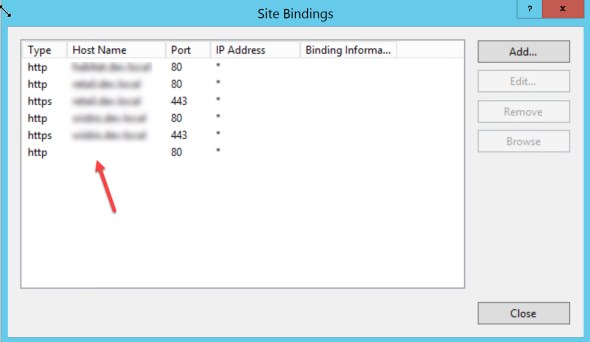
If you want to access this website using more than one address you have a few options:
- Add a new network interface card to your VM. This will give you the potential to have a new public IP address.
- Use an empty binding on the website but use a different port to the default 80. If you chose this option, make sure the port is open in your VM’s network security group AND also in the windows firewall in your host operating system.
- (Only for development purposes) Use the new address and put in your host file and map it to your local machine (127.0.0.1)
- Buy a custom domain and use a CNAME record in your DNS provider to map the new domain to the IP address of the VM.
First blog post
Hi, I’m Vahid Ghattavi and this would be a place that I put all my writings on Azure, Sitecore and .Net development. I will occasionally write about other topics as the interest arises.
 Vahid Ghattavi