
You might have faced the need to access a website hosted on Azure VM using multiple addresses. This is particularly true if there are different domains you would like to associate with your website.
The problem is that unless you have purchased custom domains, you only get one DNS name that can be applied to a VM. This is configured in the overview blade in Azure portal:

In the above image, the address will point to the default website on the VM. Or more accurately, to the website which has the default binding on IIS. The default binding is the one highlighted below with an empty host name:
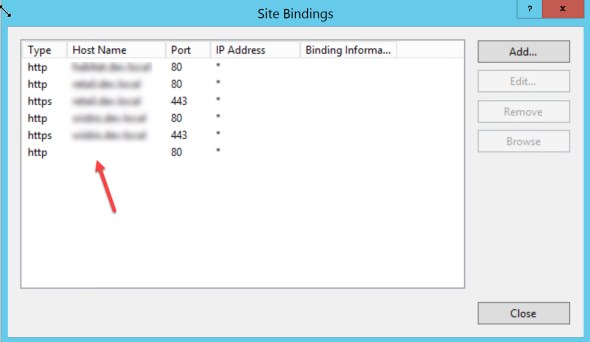
If you want to access this website using more than one address you have a few options:
- Add a new network interface card to your VM. This will give you the potential to have a new public IP address.
- Use an empty binding on the website but use a different port to the default 80. If you chose this option, make sure the port is open in your VM’s network security group AND also in the windows firewall in your host operating system.
- (Only for development purposes) Use the new address and put in your host file and map it to your local machine (127.0.0.1)
- Buy a custom domain and use a CNAME record in your DNS provider to map the new domain to the IP address of the VM.
 Vahid Ghattavi